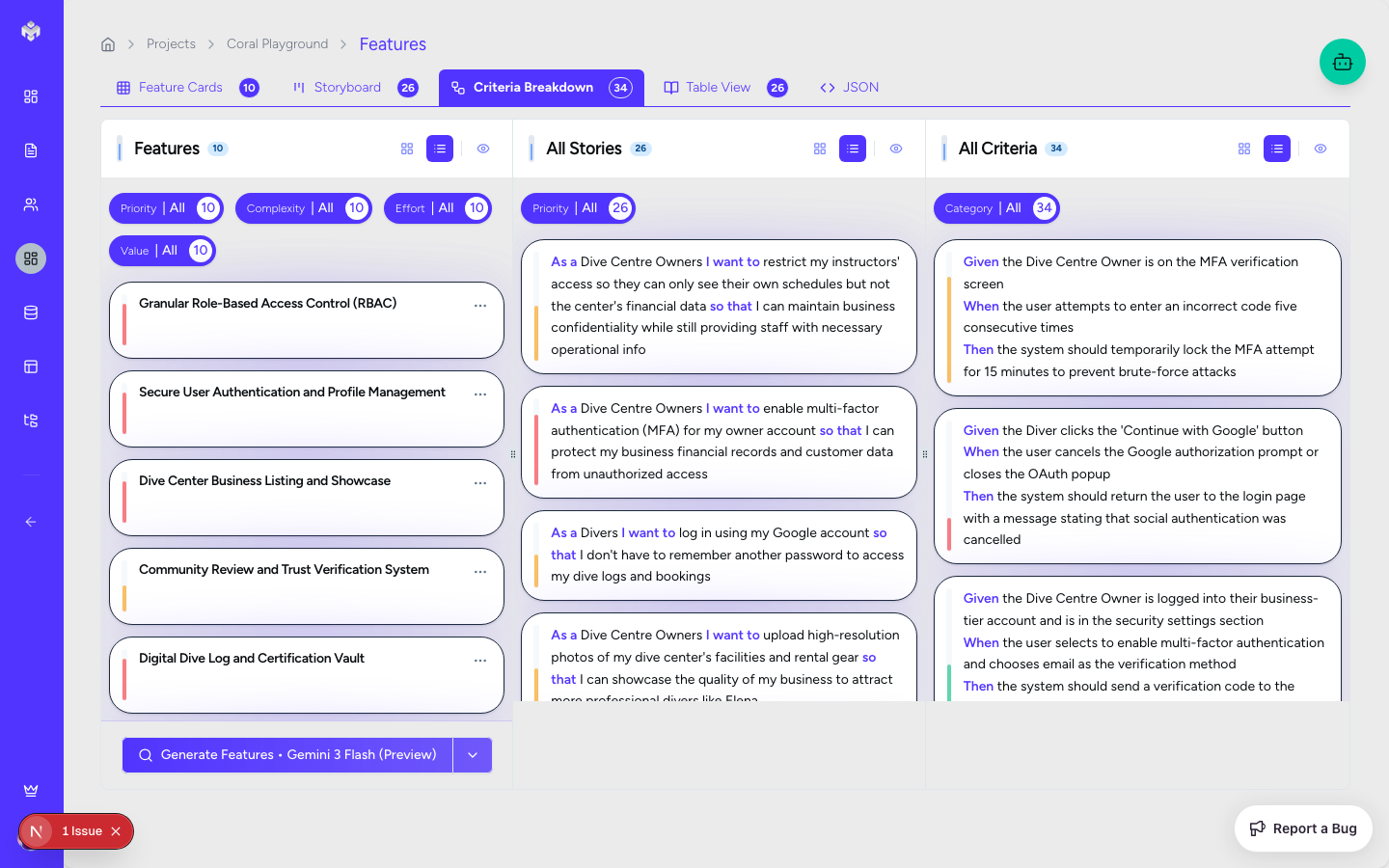
Acceptance Criteria Generation

Acceptance Criteria (AC) define the specific requirements that must be met for a user story to be considered complete. Vibemap generates these to provide clear, unambiguous guidance for development and testing, ensuring that the "Definition of Done" is shared across the entire team.

Criteria Breakdown View

Accessing Acceptance Criteria Section

Acceptance Criteria are managed within the Features section to keep them closely tied to the user stories they validate.

  1. Navigate to the Features page.

  2. Select the "Criteria Breakdown" tab for a hierarchical view.

  3. Alternatively, click on any User Story in the Table View to see its specific criteria in the details panel.

Page Layout

  • Criteria Table: Displays all criteria grouped by their parent user story.

  • Story Headers: Clear section headers that provide context for the requirements.

  • Filters: Filter by completion status (Not Started, In Progress, Completed) or priority.

Generating Acceptance Criteria

Automated Generation

When you generate user stories, Vibemap automatically populates them with a set of initial acceptance criteria. These are derived from:

  1. The high-level Feature Description.

  2. The specific User Goal defined in the story.

  3. Industry-standard edge cases for the specific functionality (e.g., validation rules for forms).

What Gets Generated

  • Functional Criteria: Specific technical behaviors (e.g., "The system must send a confirmation email after signup").

  • Non-Functional Criteria: Performance, security, or usability requirements (e.g., "The page must load in under 2 seconds").

  • Edge Cases: Requirements for handling invalid input or error states.

  • User Interface Requirements: Specific visual cues or interaction patterns.

Criteria Breakdown View

The Criteria Breakdown view is the primary interface for quality assurance and technical planning.

Columns & Attributes

  • Description: The specific requirement text (Editable).

  • Type: Classification as Functional or Non-functional.

  • Priority: High/Medium/Low assignment.

  • Status: Current development/testing status.

  • Testable: A toggle indicating if the criteria is verifiable via automated tests.

Detailed Criteria View

Acceptance Criteria Types & Examples

Vibemap generates criteria in two primary formats: checklist style and behavior-driven (Given/When/Then).

Functional Criteria Examples

  • Behavioral: "Given a user enters an invalid email, when they click submit, then an error message 'Invalid Email Format' must be displayed."

  • Checklist: "The system must support file uploads up to 10MB in PNG and JPG formats."

Non-Functional Criteria Examples

  • Security: "Passwords must be hashed using bcrypt before being stored in the database."

  • Performance: "The search results must be returned within 500ms for a dataset of 10,000 items."

Poor Criteria Examples to Avoid

  • Vague: "The app should be easy to use." (Not measurable).

  • Unverifiable: "Users should feel happy with the UI." (Subjective).

Manual Management

Adding Custom Criteria

  1. Open the details for a User Story.

  2. Click "Add Criteria".

  3. Enter a clear, measurable description.

  4. Assign a type (Functional/Non-functional) and priority.

Editing and Refining

AI-generated criteria provide a strong baseline, but you should refine them to match your specific compliance or technical standards. Click the edit icon in the Criteria Breakdown table to modify any requirement.

Deletion and Impact

Removing a criterion is straightforward but should be done with care. If you're using Vibemap's Code Generation features, deleting criteria may result in certain logic being omitted from the generated scaffold.

Quality Assurance & Validation

"Definition of Done"

A User Story is only considered "Done" when all of its associated Acceptance Criteria have their status set to "Completed". This status can be updated manually by developers during implementation or by QA during testing.

Testing Integration

Finalized acceptance criteria serve as the primary input for generating test cases. If you use Vibemap's technical export, these criteria are often included as comments or requirements in the generated unit test files.

Next Steps

Once your acceptance criteria are finalized, you have a complete functional specification. You can now proceed to the Schema tab to design the data models that will support these requirements.

Acceptance Criteria Management

Last updated

Was this helpful?